
Connecter votre boutique, c'est bien. Mais connecter votre Google Search Console (GSC), c'est passer au niveau supérieur.
Pourquoi ? C'est simple :
- Le scan crawl analysait la théorie (est-ce que votre page est bien faite ?).
- La Search Console vous donne la réalité (sur quoi vous sortez vraiment ? combien de gens cliquent ?).
En connectant GSC, Fexa AI croise ces deux mondes pour vous dire : "Hé, ce produit est en page 2 sur un mot-clé très recherché. Optimise-le un peu et passe en page 1 !"
C'est ce qu'on appelle la Striking Distance (zone de frappe).
Prérequis
- Avoir un compte Google avec accès à la propriété GSC de votre boutique.
- Que votre propriété soit bien validée dans GSC (Domain property ou URL prefix).
Étape 1 : Accéder aux paramètres d'intégration
Allez dans Paramètres (Settings) > Google Search Console.
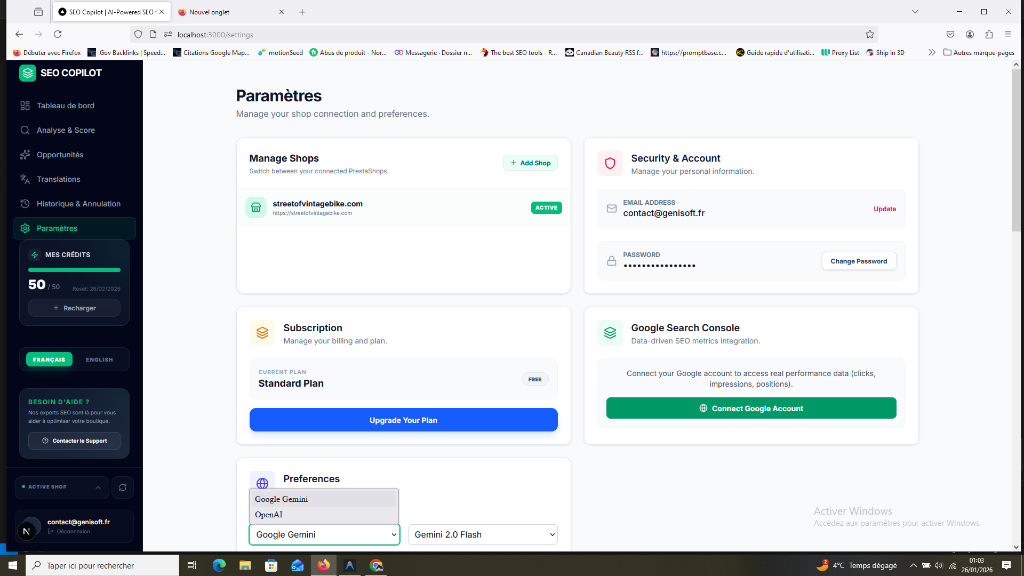 (Regardez la carte "Google Search Console" en bas à droite)
Étape 2 : Lancer la connexion
- Cliquez sur le bouton vert "Connect Google Account".
- Une fenêtre Google va s'ouvrir. Sélectionnez le compte Google qui gère votre Search Console.
- Important : Acceptez les permissions. Fexa AI a besoin de lire vos performances pour trouver les opportunités. Nous ne modifions rien sur votre GSC.
Étape 3 : Sélectionner la propriété
Une fois connecté, Fexa AI va lister toutes les propriétés (sites) associées à votre compte Google.
Sélectionnez celle qui correspond à la boutique connectée.
Attention : Assurez-vous que l'URL correspond exactement (http vs https, www vs non-www) si vous utilisez une propriété de type "Préfixe d'URL".
Reconnexion automatique : si votre autorisation Google expire ou est révoquée, Fexa AI affiche un bandeau « Reconnecter Google » sur le tableau de bord. Un clic suffit pour relancer la synchronisation — vos données ne restent jamais bloquées en silence.
Les nouvelles fonctionnalités débloquées 🔓
Une fois connecté, la magie opère. Retournez sur votre Dashboard.
1. Le graphique de performance
Sur le tableau de bord, la section "Search Console Performance" n'est plus floutée. Vous voyez vos Clics et Impressions des 30 derniers jours directement.
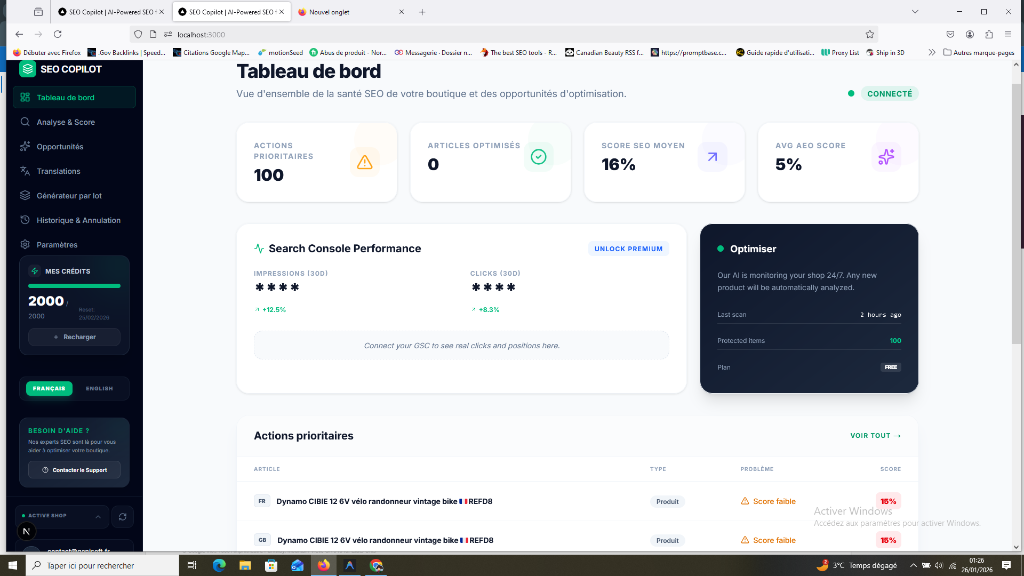
2. La section "Opportunités"
C'est le plus gros gain. Allez dans le menu Opportunités.
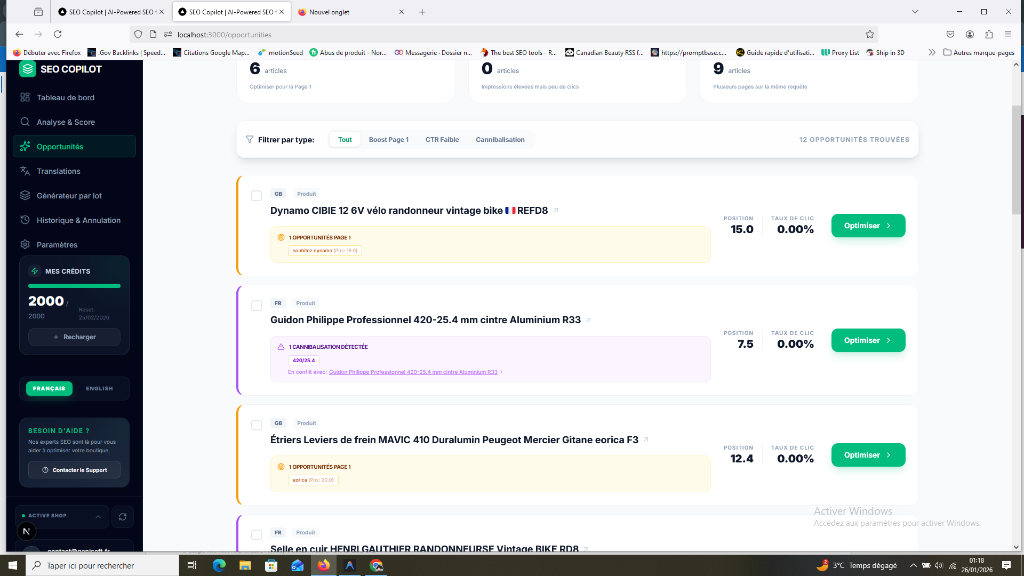
Vous avez maintenant accès à :
- Striking Distance : Les mots-clés en position 11-20 (page 2) qu'il est facile de faire monter.
- Cannibalisation : Les pages qui se battent entre elles sur le même mot-clé.
- Faible CTR : Les pages qui sont bien classées mais que personne ne clique (titre ou description à revoir d'urgence !).
Prochaine étape : La chasse aux trésors
Votre GSC est connectée. Vous avez maintenant une carte au trésor avec des croix marquées dessus. Dans le prochain tutoriel, je vais vous apprendre à lire cette carte et à déterrer les gains de trafic faciles.
Prochaine étape : Identifier les mots-clés en Striking Distance