
L'audit initial est la pierre angulaire de votre stratégie e-commerce. C'est ici que vous passez votre boutique au "rayon X" pour identifier les blocages techniques et les opportunités de croissance cachées.
TL;DR : Pourquoi faire un audit SEO avec Fexa AI ?
- 100 % gratuit et illimité : le scan et l'audit ne consomment aucun crédit. Auditez toute votre boutique avant de dépenser quoi que ce soit (voir le système de crédits).
- Gain de temps : analyse de milliers de produits en quelques minutes.
- Précision IA : détection d'erreurs sémantiques que les outils classiques ignorent.
- Score de visibilité IA (AEO) : vérification de la compatibilité de vos produits avec les moteurs de réponse (ChatGPT, Google SGE) et la recherche vocale.
1. Lancer votre premier scan PrestaShop
Dans le menu latéral, cliquez sur Scan & Score. Si c'est votre première fois, cliquez sur le bouton central "Analyze Now" (ou "Lancer l'analyse").
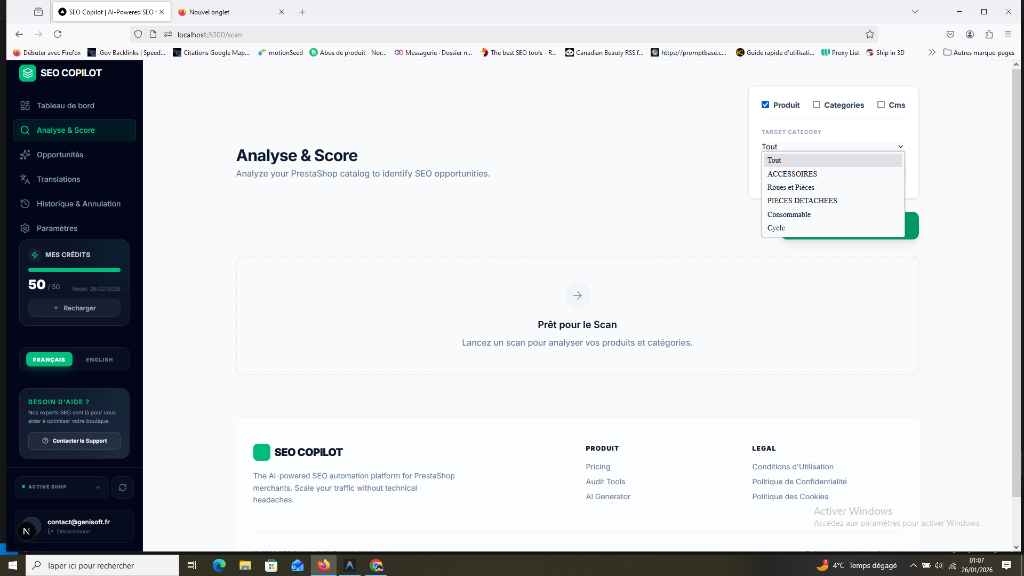
Fexa AI va automatiquement :
- Parcourir tous vos produits actifs et catégories.
- Analyser vos métadonnées (Title, Description).
- Vérifier vos balises ALT d'images.
- Scanner votre contenu pour la densité sémantique (H1, H2).
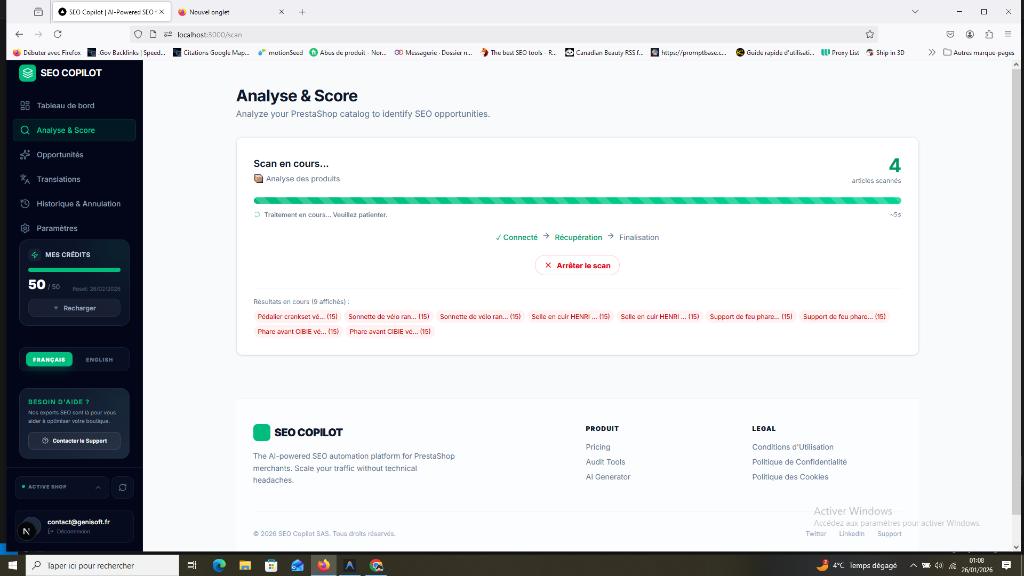
Vitesse : Fexa AI peut scanner environ 1000 produits en quelques minutes. Vous pouvez quitter la page, le scan continuera sur nos serveurs.
2. Interpréter vos Scores (SEO vs Visibilité IA)
Une fois le scan à 100%, vous découvrez deux notes cruciales : le Score SEO (pour Google) et le Score de visibilité IA (pour les résultats IA).
Pour comprendre comment ces scores impactent vos ventes, consultez notre guide : Comprendre le tableau de bord et les KPIs.
3. Analyser et Filtrer pour Prioriser
Le tableau détaillé est votre plan d'action. Ne cherchez pas à tout corriger d'un coup. Priorisez :
- Priorité 1 : Produits avec Trafic (GSC) Filtrez les produits qui font déjà des impressions mais qui ont un score faible. Ce sont vos gains les plus rapides.
- Priorité 2 : Erreurs Critiques Corrigez d'abord les balises Title manquantes ou trop courtes.
FAQ : Questions fréquentes sur l'audit
Combien de temps prend un audit complet ? Pour une boutique de 500 produits, l'audit prend généralement moins de 3 minutes.
Puis-je scanner uniquement une catégorie spécifique ? Oui, vous pouvez filtrer par catégorie avant de lancer le scan pour vous concentrer sur une section précise de votre catalogue.
Le scan ralentit-il ma boutique PrestaShop ? Non. Fexa AI utilise des requêtes optimisées qui ne sollicitent pas le serveur de votre boutique durant la navigation de vos clients.
[!NOTE] Exports & Reporting : Des rapports détaillés et exports CSV sont en développement pour les utilisateurs du plan Entreprise, facilitant le reporting client pour les agences.
Prochaine étape : Utiliser le Mode Focus